
Optimising (compressing) digital audio files
Introduction
NOTE: If you have not already read the article on Digital Audio File Formats you should do so before reading this page.
There are 3 primary situations in which you will need to compress audio ...
- To create network (internet etc) friendly audio file sizes
- To reduce the size of video files by compressing the soundtrack audio
- To compress audio for DVD authoring
Audio compression for the internet
As you are no doubt aware, MP3 is the current dominant file format for the web. Its popularity makes it the best choice and almost guarantees compatibility with all internet end-user systems.
MP3 compression programs
Many people use iTunes to convert uncompressed CD quality audio into MP3 files but almost all audio editing software will allow you to export to MP3. Programs include ...
- Cubase
- Logic
- Performer
- Sound Forge
- Peak
- Audacity
- etc etc
MP3 parameters (settings) to alter
When creating MP3 file you can experiment with the following settings ...
- Data Rate This will vary the "strength" of compression. How this achieved depends on the compression codec and it is rare to have access to more than just an overall bit rate (kilo bits per second) control.
- Variable bit rate This constantly alters the bit rate to achieve the best file size to quality ratio for the material.
- Sample rate Use 44.1kHz if you can. 32kHz is acceptable and you will notice a loss of quality at 20.050kKHz.
- Bit-depth Use 16-bit if you can. 12-bit is acceptable.
- Channels I use mono for previews and stereo for everything else
Suggested MP3 parameter settings
Experiment but here are a few suggestions ...
Previews = 96kbps, 32kHz, 12bit, mono, variable bit rate on/medium quality
Standard quality = 128kbps, 44.1kHz, 16bit, stereo, variable bit rate on/medium quality. Most internet MP3 file are encoded with these settings
High quality = 192 - 224kbps, 44.1kHz, 16bit, stereo, variable bit rate on/high quality
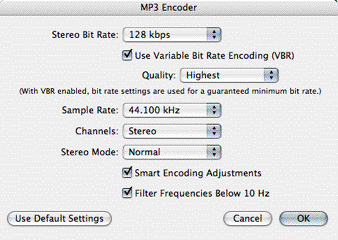
iTunes MP3 encoder settings.
AAC compression
if you choose the AAC encoder in iTunes it chooses settings automatically for you. Try it out. If anyone knows more about this codec and alternative ways to encode files with it, please drop us an email.
Audio compression for DVD
Audio compression for internet and CD/DVDROM video
Related downloads
None at present
